
PIM Is Not Enough | Here's What Most Orgs Miss

#PIM #EntraID #ZeroTrust #IAM
As the modern threat landscape continues to evolve, Identity Administrators are at the forefront of protecting their users. Today’s topic will cover the potential gaps and risks that are posed to Entra Admins and why leveraging a P2 (Microsoft Entra P2 or Entra Suite....I know, I know...licensing...ew) feature by itself, is not enough.
Let me be direct: enabling PIM and calling it a day is one of the most common mistakes I see organizations make. It checks a compliance box, sure. But a PIM deployment without properly configured controls isn't a security posture, it's a security prop. Let's break down why, starting from the beginning.
So, What Is PIM?
"Privileged Identity Management (PIM) is a service in Microsoft Entra ID that enables you to manage, control, and monitor access to important resources in your organization."
"Privileged Identity Management provides time-based and approval-based role activation to mitigate the risks of excessive, unnecessary, or misused access permissions on resources that you care about."
— Microsoft Learn
To put it simply, Microsoft Privileged Identity Management (aka PIM) allows your organization to dish out Entra, Azure, or Group membership roles as time-bound and/or approval-bound to users in your environment. Instead of a permanent standing assignment, a user gets eligibility and must actively request and activate that role when they need it.
PIM covers three surfaces today:
- Microsoft Entra roles directory roles including built-in and custom roles across Entra ID and Microsoft 365 online services
- Azure resource roles RBAC roles granting access to management groups, subscriptions, resource groups, and resources
- PIM for Groups just-in-time access to membership and ownership of Entra security groups, which can unlock access to Intune, Key Vault, Azure Information Protection, and more
Assignment Types: Know What You're Working With
Diving into the meat and potatoes of how PIM functions, it's important to understand the two core assignment types because confusing them is where real configuration gaps start.
| Assignment Type | Description |
|---|---|
| Eligible | The user has the right to activate the role but doesn't hold it permanently. Activation is required and can be gated behind MFA, approval, justification, and more. |
| Active | The role is permanently held without requiring activation. This is the standing privilege model PIM is designed to replace. You should realistically only reserve this for break-glass accounts. |
Each of these can be time-bound - with a defined start and end date - or permanent. That gives you four possible assignment shapes to work with. The goal is to drive privileged access toward time-bound eligible, and eliminate standing active assignments wherever possible.
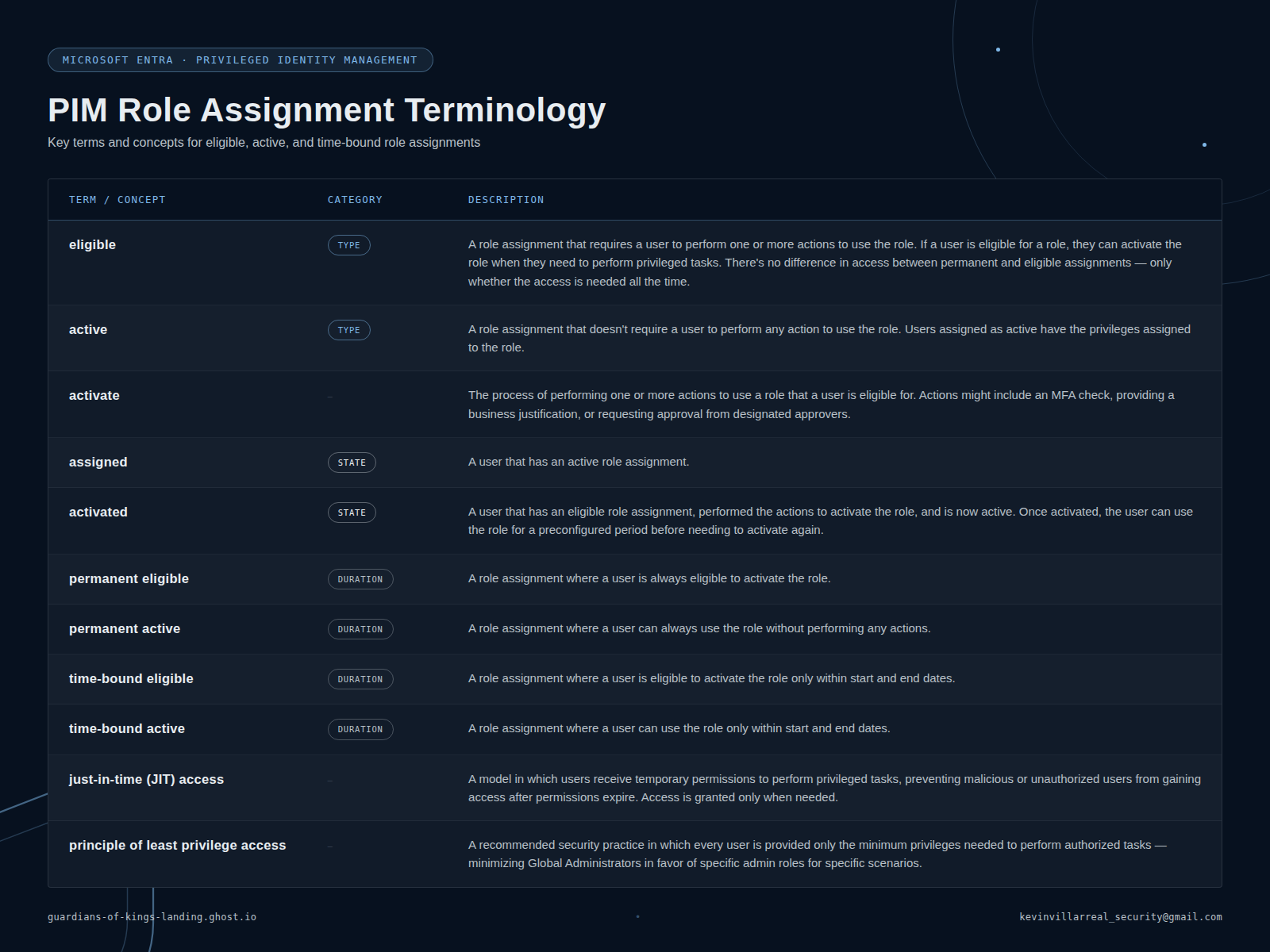 PIM Role Assignment Terminology
Now that we've covered what PIM is, what roles it covers, and the terminology surrounding the technology, let's take a peek at what security controls are available and what controls are enabled by default.
The Controls Available to You
Each Entra and Azure role setting can be uniquely modified to best fit the needs of your organization. This level of control can make PIM super simple or utterly complex. That decision lies with you. My advice: keep it simple, and document everything. With the power of AI and the tooling available today, creating documentation is a straightforward task. There's no excuse for an undocumented PIM configuration.
Role setting details: default state out of the box (Activation tab)
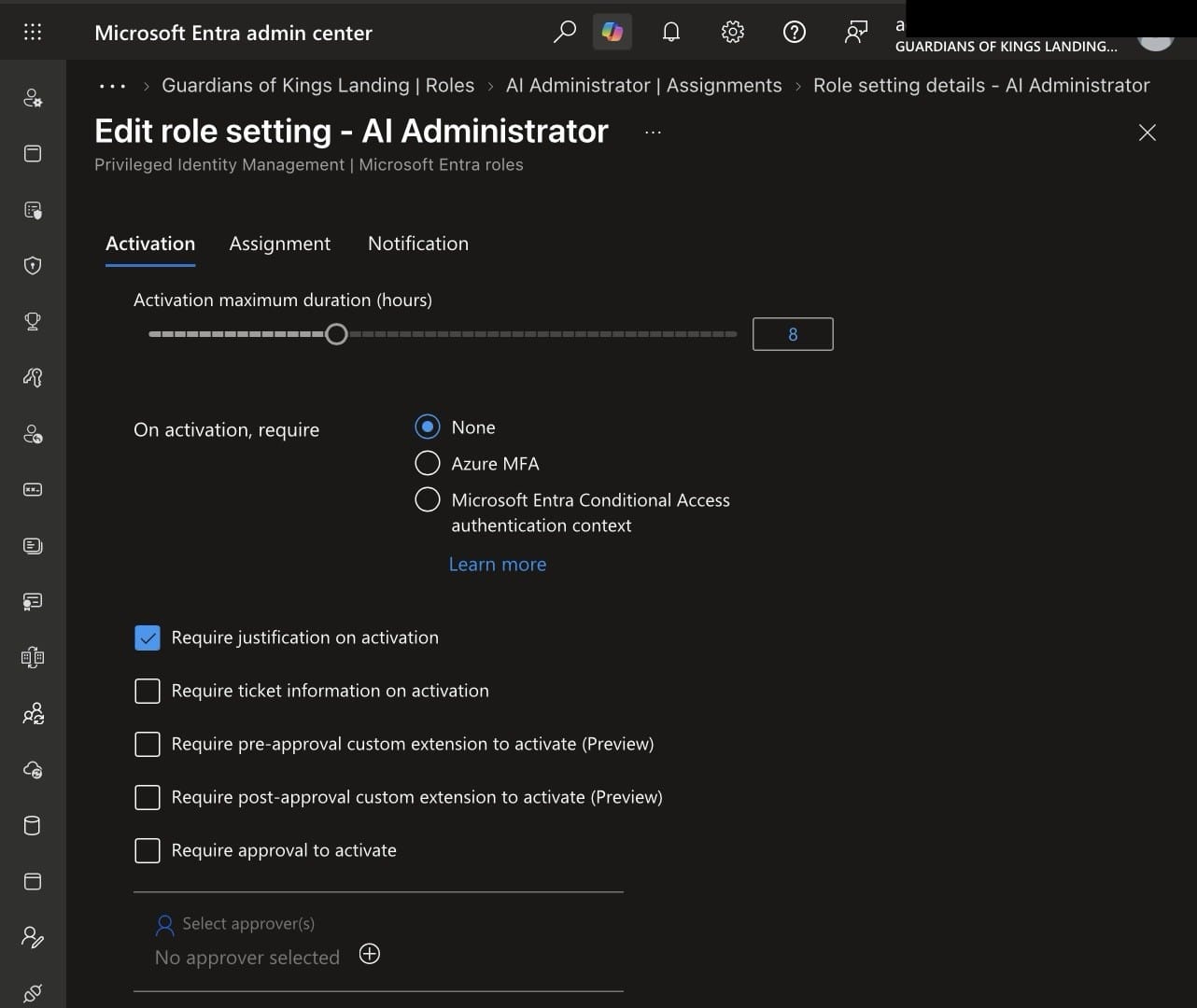
Edit role setting: On activation, require: None is selected by default. This is the gap.
Out of the box, only a handful of controls are enabled by default. And that's exactly where the problem starts.
Eligible Doesn't Mean Secure. Not Without the Right Controls
Here's the biggest takeaway of this entire post. Simply dishing out a privileged role as permanently eligible (meaning a user needs only to activate their role) without the proper means of control is like giving someone the key to a vault and asking that they return it when they're done. What will they do in there? For how long? Who checks that it's actually them and not an imposter?
(Insert Among Us meme. You know the one.)
I've seen many organizations implement PIM without implementing the additional security controls that make it meaningful. Implementing PIM without the controls necessary to truly lock down the role can be more of a compliance check than a security one.
So why does this matter beyond compliance? Two words: AiTM threats.
AiTM, Session Hijacking, and the Assume Breach Mindset
Adversary-in-the-Middle attacks are at an all-time high and they directly threaten the assumptions most PIM deployments are built on. The Assume Breach pillar of Zero Trust tells us we must operate as though a threat actor is already present in the environment. With that lens on, consider this: a threat actor with visibility into your audit logs can watch PIM activations in real time. They need only wait for an admin to activate their role and with a sprinkle of luck and a stolen session token, step in right behind them.
That brings us to the most misunderstood default control in PIM.
Require Azure MFA: Great at First Glance, Incomplete by Design
Requiring MFA on role activation is a great control... at first glance. But here's the gap: PIM's MFA requirement can be satisfied by an existing MFA session.
Here's the scenario. An admin logs into the Entra portal first thing in the morning, is prompted for MFA, as they should be, and immediately goes to activate their role for the workday. No new MFA prompt is issued. The existing session satisfies the control. This is by design.
⚠️ Security Gap: If a threat actor has already hijacked that admin's session via an AiTM proxy (capturing the session token post-MFA) they now hold a token that satisfies PIM's MFA requirement. The control is technically met. The account is effectively compromised. MFA alone does not protect against session token theft.
This isn't a flaw in PIM, it's a deliberate UX tradeoff. But it means relying on MFA alone as your activation control is insufficient in any environment where AiTM is a realistic attack vector. So what's the actual answer?
It Depends. Conditional Access and Authentication Contexts Can Help.
Microsoft has introduced Conditional Access authentication context as a PIM activation control and it adds meaningful depth to your layered defense. But it's worth understanding exactly what it does and doesn't cover, because there's a gap here that's easy to miss.
Authentication context allows you to require a fresh, step-up authentication at the moment of role activation, independent of the user's existing session. Even if an attacker holds a valid session token, they cannot satisfy a context-bound activation requirement without re-authenticating through a Conditional Access policy you control. That's a real improvement over MFA alone.
But activation and usage are two different moments and one CA policy doesn't cover both.
Consider this scenario: a user activates their role from an Intune-compliant device, satisfying the authentication context policy. Then they switch to a personal, non-compliant device and use that already-activated role from there. The activation was clean. The usage wasn't. And unless you have a second policy covering that, nothing catches it.
This is why Microsoft's guidance recommends a two-policy approach:
-
Policy 1 — Targets authentication context: Scoped to all users or eligible users. This policy enforces the requirements users must meet to activate the role, phishing-resistant MFA, compliant device, specific network location, whatever your risk posture demands.
-
Policy 2 — Targets directory roles: Scoped to the roles themselves. This policy enforces the requirements users must meet to sign in and operate with the role active. Ensuring the same (or stricter) bar applies throughout the entire session, not just at the moment of activation.
Both policies can enforce the same requirements or different ones depending on your needs. You can also skip the auth context approach entirely and instead scope a Conditional Access policy directly to eligible users. For example, requiring that anyone eligible for a high-privilege role always use a compliant device, regardless of whether they've activated it yet.
The right answer depends on your environment, your users, and your threat model. There's no universal configuration. What matters is that you've thought through both moments, activation and usage, rather than assuming one policy covers the full picture.
Recommended: Layer Your Activation Controls
- Require Azure MFA: keep it enabled as a baseline floor
- Require Conditional Access authentication context (Policy 1): enforce phishing-resistant MFA (Windows Hello, FIDO2, or certificate-based) at activation time, forcing a fresh challenge a stolen token cannot satisfy
- Apply a directory role-scoped CA policy (Policy 2): ensure the same compliance bar holds for the duration of the session, not just at activation
- Require justification: forces intentionality, builds an audit trail, and creates friction that matters during incident review
- Require approval for your highest-privilege roles. A human in the loop remains one of the strongest controls available
- Cap activation duration: shorter windows limit the blast radius of any successful session compromise
The combination of both CA policies, phishing-resistant MFA, and a short activation window makes session token replay dramatically harder to operationalize, even for a well-resourced AiTM threat actor.
After Go-Live: Audit, Review, and Stay Sharp
Going live is not the finish line. The controls you configure on day one erode without operational discipline to maintain them. These need to be habits, not afterthoughts:
- Review audit logs weekly: PIM retains 30 days of activation and assignment history. Look for activations outside business hours, roles activated but never used, and high-frequency activations of the same role by the same user.
- Export logs monthly: feed them into your SIEM. Don't wait for an incident to discover you needed this data three weeks ago.
- Enable security alerts for both Entra and Azure resource roles. These fire on patterns like admins bypassing PIM, excessive Global Admins in the tenant, or role assignments made outside PIM. Wire those to your SOC, not a generic inbox.
- Run access reviews quarterly: at minimum for Global Admin and Privileged-labeled roles. The review workflow is automated; the discipline to actually act on the results is not. Auto-approving reviews defeats the entire purpose.
- Protect your break-glass accounts: these must remain permanently active Global Administrators, cloud-only, excluded from CA policies, and monitored for any sign-in activity. Two accounts minimum. These are your recovery path if PIM breaks.
PIM Is a Commitment, Not a Configuration
Privileged Identity Management is one of the highest-ROI controls available in the Microsoft Entra ID Governance stack but only when deployed with intention. Turning it on without configuring the controls, thinking through the threat model, or building an operational rhythm around it is a compliance win and a security loss.
The technology is solid. The threat landscape is not waiting. Build your PIM deployment like a threat actor is watching your audit logs, because they just might be.